> For the complete documentation index, see [llms.txt](https://ascent.webvista.studio/llms.txt). Markdown versions of documentation pages are available by appending `.md` to page URLs; this page is available as [Markdown](https://ascent.webvista.studio/webvista-studio-docs/sections/fen-lei-tu-biao-lie-biao.md).
# 分类图标列表
分类图标列表用于在页面上展示多个产品分类,每个分类都可以包含一个图标和产品系列的名称。通过此功能,您可以帮助用户快速浏览并导航到他们感兴趣的产品类别。
### **功能详情**
1. 适应透明图片
如果你的分类图片是透明图片,请启用该选项。
2. **布局样式**
您可以选择分类图标列表的布局样式:
* **水平**: 所有分类图标和标题将水平排列,适合横向布局。
 * **垂直**: 所有分类图标和标题将垂直排列,适合纵向布局。
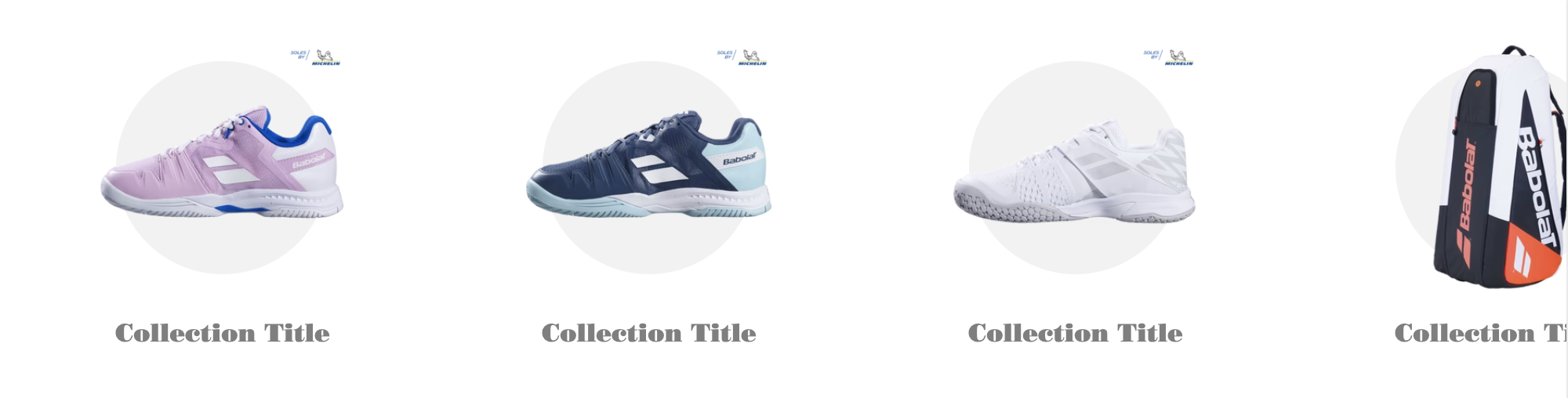 3. **图标块设置**
每个图标块代表一个产品分类。您可以为每个分类设置以下内容:
* **图像**: 上传产品分类的图片,这通常用于展示该分类的特色产品。
* **选择产品系列**: 从现有的产品系列中选择一个作为该分类的内容来源。
* **自定义系列标题**: 如果需要,您可以为产品系列设置一个自定义标题,该标题将显示在图标下方。
### **使用建议**
* **清晰导航**: 使用分类图标列表帮助用户快速识别并导航到他们感兴趣的产品分类。确保图标和标题清晰明了,便于用户理解。
* **统一风格**: 在配置配色方案和图标样式时,保持风格的一致性,以增强品牌形象和用户体验。
* **定期更新**: 根据网站的产品更新或促销活动,及时更新分类图标和产品系列内容,保持内容的新鲜感。
3. **图标块设置**
每个图标块代表一个产品分类。您可以为每个分类设置以下内容:
* **图像**: 上传产品分类的图片,这通常用于展示该分类的特色产品。
* **选择产品系列**: 从现有的产品系列中选择一个作为该分类的内容来源。
* **自定义系列标题**: 如果需要,您可以为产品系列设置一个自定义标题,该标题将显示在图标下方。
### **使用建议**
* **清晰导航**: 使用分类图标列表帮助用户快速识别并导航到他们感兴趣的产品分类。确保图标和标题清晰明了,便于用户理解。
* **统一风格**: 在配置配色方案和图标样式时,保持风格的一致性,以增强品牌形象和用户体验。
* **定期更新**: 根据网站的产品更新或促销活动,及时更新分类图标和产品系列内容,保持内容的新鲜感。